
Agreement Management

This page shows you the agreement status, who signed, who completed IDV and lets you add or edit details.
How it works
You will go here after you Proceed to Sign or Proceed to IDV. You can return to the Management page by selecting the client from the Dashboard.
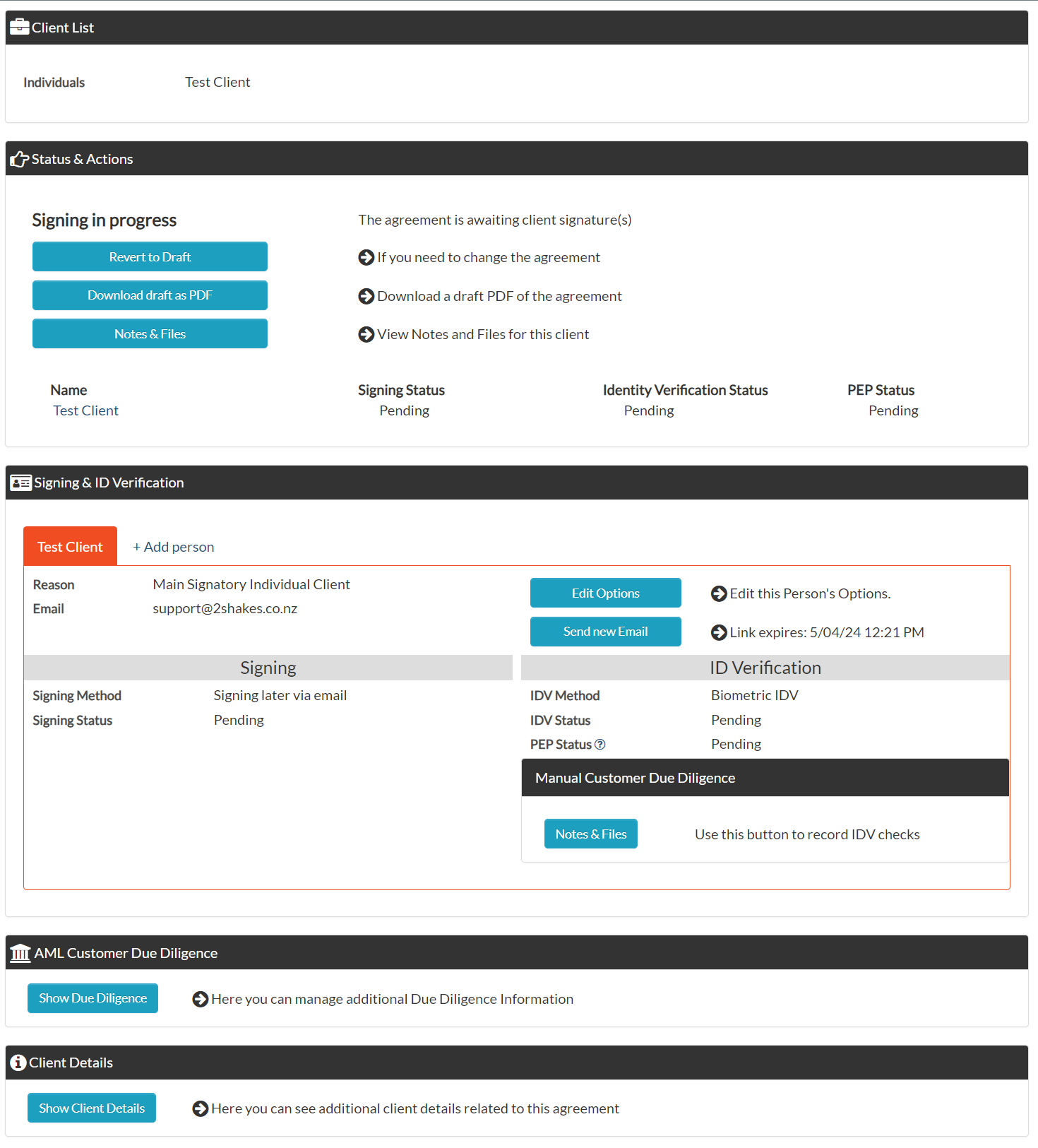
Client Management Page sections
Client List
Lists the client entities.
Status & Actions
See the current status of the agreement and the available actions for this status.
Signing & ID Verification
Track the signing and/or IDV method and status for the people on the agreement. Select the Red tab with the persons name to display their details. The edit button lets you correct details or change to a different method. You can also + Add person for ID verification from this section.
AML Customer Due Diligence
This section will only apply for AML clients. Click on the Show Due Diligence button to open it and review and update CDD information. When all AML CDD steps are completed the AML Complete button shows for your Compliance officer to use to change the status to complete.
Client Details
You can review the details of the agreement and all authorities in this section.
More Help
Didn’t find what you need here? You can find lots more help on our AML Support page.
Or you can contact us or email us at support@2shakes.com.au and we can help you with what you need to know.